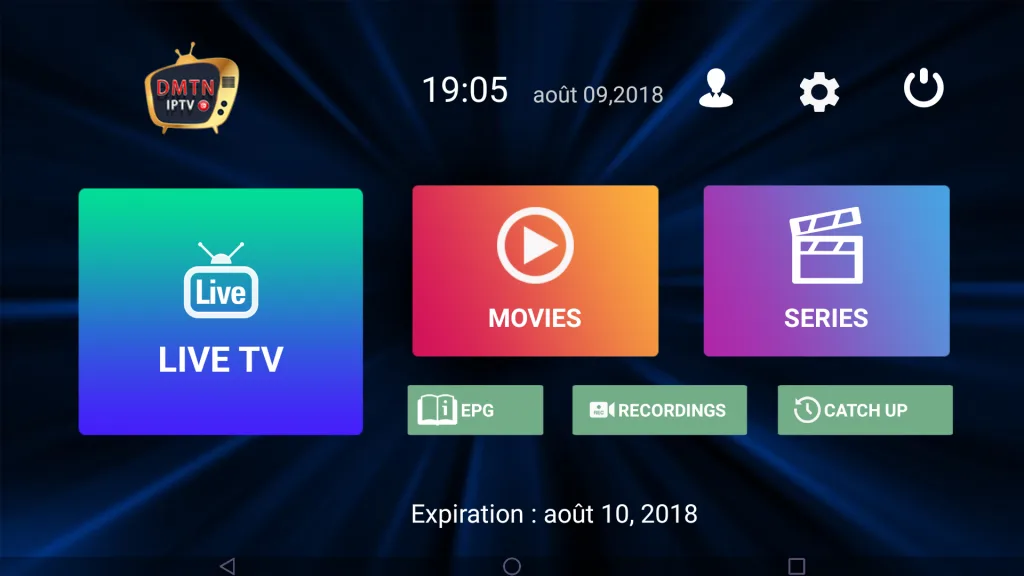
What Is the DMTN IPTV App?
The DMTN IPTV app is an Android media application created for customers with an active DMTN account. It offers an organized interface for navigating the live channels, movies and series available with the selected subscription package.
Its interface is optimized for television screens, making it easier to navigate menus and categories using a compatible remote control.
Install DMTN8K
Install with the Downloader App
Android · Android TV · Android Box · Amazon Fire TV / Fire Stick
Install the free Downloader app first, then message DMTN Support — your personal installation code is sent to you on WhatsApp.
Get the Code on WhatsApp
-
Install Downloader
Install the free Downloader app: Google Play for Android / Google TV. On Fire TV / Fire Stick, search for “Downloader” in your device’s Amazon Appstore.
-
Request Your Code
Message DMTN Support on WhatsApp and your personal installation code is sent to you.
-
Enter the Code
Open Downloader and enter the code you received, then press Go.
-
Download DMTN8K
Open the destination provided by Downloader and download the official DMTN8K application.
-
Allow Installation
If your device asks for permission to install apps from this source, enable it only for this installation, as required by the device.
-
Open and Activate
Open DMTN8K and enter the account and activation details supplied by DMTN Support.
Fire TV / Fire Stick
Your Fire TV may ask you to allow Downloader to install apps. The exact menu wording can vary by Fire OS version.
Android / Android TV
Enable installation permission only when prompted, and only for the installation source you are using.
Need help installing DMTN8K? Contact DMTN Support.
Main DMTN App Features
Android TV Support
Designed for Android TV, Android Box and compatible Android streaming devices.
TV-Friendly Interface
Navigate categories and playback options using a standard compatible television remote control.
Organized Categories
Browse the services included with your account through clearly organized sections.
Movies and Series
Access the movie and series categories available with your active subscription package.
Recording Support
Recording may be supported on compatible devices and supported streams.
Customer Support
Get assistance with installation, account activation, login details and basic troubleshooting.
Supported Devices
Android TV
Televisions running Android TV with access to the Downloader app or an official installation link.
Android TV Box
Android boxes connected to your television, installed the same way as Android TV.
Fire TV / Fire Stick
Amazon Fire TV devices, installed through the Downloader app with the code provided by DMTN Support.
Other Android Devices
Compatible Android-based streaming devices with an active DMTN account.
Compatibility notice: Device compatibility may vary depending on the Android version, device performance, available storage and application version.
How to Install the DMTN App
The fastest method is the Downloader code above. If you prefer a direct installation link instead, DMTN Support can provide one — the steps are the same from download onwards.
-
Contact DMTN Support
Contact DMTN Support to obtain the official installation link.
-
Open the Link
Open the link on your compatible Android device.
-
Download
Download the latest official application version.
-
Allow Installation
Allow installation from the selected source when requested.
-
Open the App
Open the application after installation.
-
Sign In
Enter the account information provided after activation.
Download the application only through an official DMTN source or a link provided directly by DMTN Support.
DMTN App Recording Feature
Recording may be available on compatible devices and supported streams. Availability depends on the device model, available storage, application version and stream compatibility.
- Confirm the device has sufficient free storage.
- Keep the device connected to power while recording.
- Use a stable internet connection.
Internet Connection and Playback
Playback quality and live-stream latency may vary depending on the internet connection, device performance, selected quality and original broadcast source.
- Use a stable internet connection.
- Select a quality suitable for your connection speed.
- Restart the router and Android device when necessary.
- Close unnecessary applications running in the background.
- Use an Ethernet connection when available.
Need Help with the DMTN App?
DMTN Support can assist with the official installation link, activation information, login details and basic troubleshooting.
Frequently Asked Questions
Is the DMTN IPTV app an Android application?
Yes. The DMTN app is intended for compatible Android TV, Android Box and Android-based streaming devices.
How do I install DMTN8K on a Fire Stick?
Install the Downloader app on your Fire TV or Fire Stick, then enter the installation code provided by DMTN Support to download the official DMTN8K application.
Does the DMTN app work without an active account?
An active DMTN account is required to access the services available through the application.
Where can I get the DMTN app installation link?
Contact DMTN Support on WhatsApp to receive the current official installation code or link.
Can I use the DMTN app on Android TV?
Yes. The application is designed primarily for Android TV, Android Box and compatible Android devices.
What should I do if playback is buffering?
Restart the router and device, close background applications, select another available quality and verify that the internet connection is stable.
DMTN app availability, features, recording functionality and accessible services may vary according to the active package, device, application version, stream compatibility and region.